

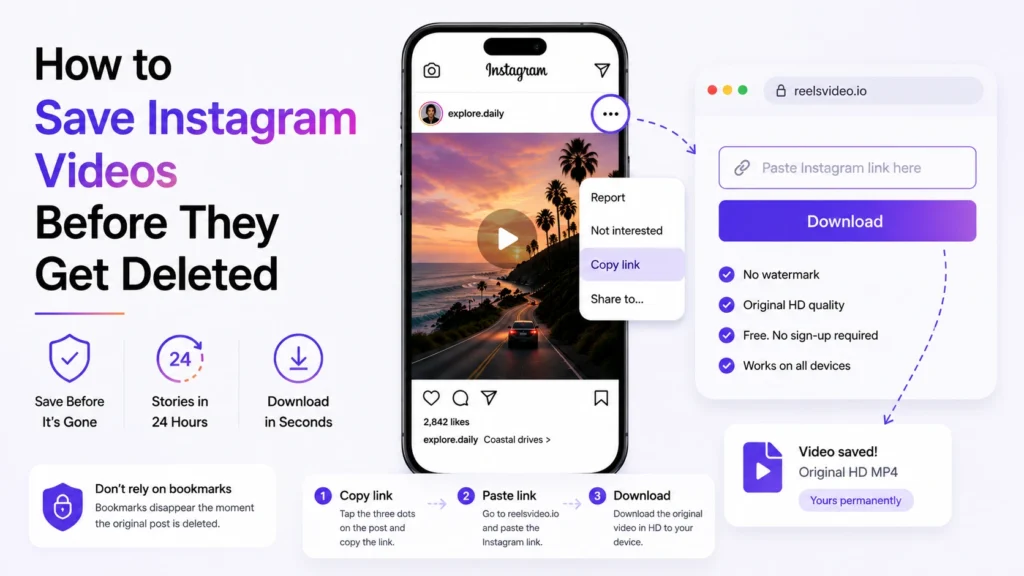
Instagram content disappears for reasons you can’t always predict — creators delete posts, accounts get deactivated, Stories expire in 24 hours. If you saved a video to your Instagram collection, that bookmark disappears the moment the original post does. The only reliable way to keep a video is to have the actual file on your device. Here’s how to save Instagram videos before they vanish — and which content types need the most urgency.
What Disappears and When
Not all Instagram content disappears the same way:
|
What disappears |
When it happens |
|
Stories |
After 24 hours — unless saved to Highlights by the creator |
|
Feed videos and Reels |
When the creator manually deletes the post |
|
IGTV content |
When the creator deletes it or deactivates their account |
|
Your saved bookmarks |
The moment the original post is deleted — instantly |
|
Highlights |
When the creator removes them from their profile |
The critical point: Instagram bookmarks are not local files. They’re references to posts on Instagram’s servers. When the post goes, the reference goes with it — there’s no recovery.
The Fastest Way to Save a Video Before It’s Gone
Open reelsvideo.io in any browser. Free, no sign-up.
- Open Instagram and find the video you want to save.
- Tap the three dots (••• on iPhone, ⋮ on Android) on the post.
- Select Copy link.
- Go to reelsvideo.io in your browser.
- Paste the link and tap Download.
- The original HD MP4 saves to your device — the file is yours regardless of what happens to the post.
The whole process takes under 30 seconds. Do it while the video is still live — once a post is deleted, no external tool can retrieve it.
On Android
Chrome downloads the file directly to your Downloads folder. It appears in Gallery without extra steps. If it doesn’t show up, check the Download folder in your file manager.
On iPhone
Safari sometimes plays the video in the browser instead of saving it. Fix: tap and hold the video in the browser, choose Download Linked File. The file appears in Files → Downloads.
On PC or Mac
Same process — copy the link, paste into reelsvideo.io, click Download. If the video opens in the browser, right-click → Save video as.
Stories: The 24-Hour Urgency
Stories are the most time-sensitive content on Instagram. Once 24 hours pass, they’re gone unless the creator archived them or added them to Highlights. If you see a Story you want to keep, act immediately.
For Stories, the process works the same way — but you’ll need the creator’s profile URL rather than a link to a specific story. Go to reelsvideo.io, enter the username, and the tool will show all active Stories from that profile.
What Happens to Your Bookmarks When a Post Is Deleted
Instagram’s bookmarks system stores a reference to the post, not the file itself. When a creator deletes their video:
- The bookmark disappears from your saved collections immediately
- There’s no notification that the content is gone
- Instagram doesn’t offer a way to recover a deleted post you had saved
- The file itself is removed from Instagram’s servers
A downloaded MP4 file on your device is unaffected by any of this — it exists independently of Instagram.
Frequently Asked Questions
Can I recover a video after the creator deletes it?
No. Once a post is deleted from Instagram, no external tool can retrieve it — the file no longer exists on Instagram’s servers. The only way to keep a video is to download it while it’s still live.
Will the creator know I saved their video?
No. Instagram doesn’t notify creators about downloads made through external tools.
Does this work for private accounts?
No. Private account content is not publicly accessible — the files aren’t served externally. You’d need to be a follower and use a screen recording as a workaround.
Save It Now — There’s No Recovery After
If you see a video worth keeping, download it while it’s live. Copy the link, go to reelsvideo.io, paste and download — the instagram video download takes under 30 seconds and the file is yours permanently. Once a post is gone, it’s gone — no tool can bring it back.