

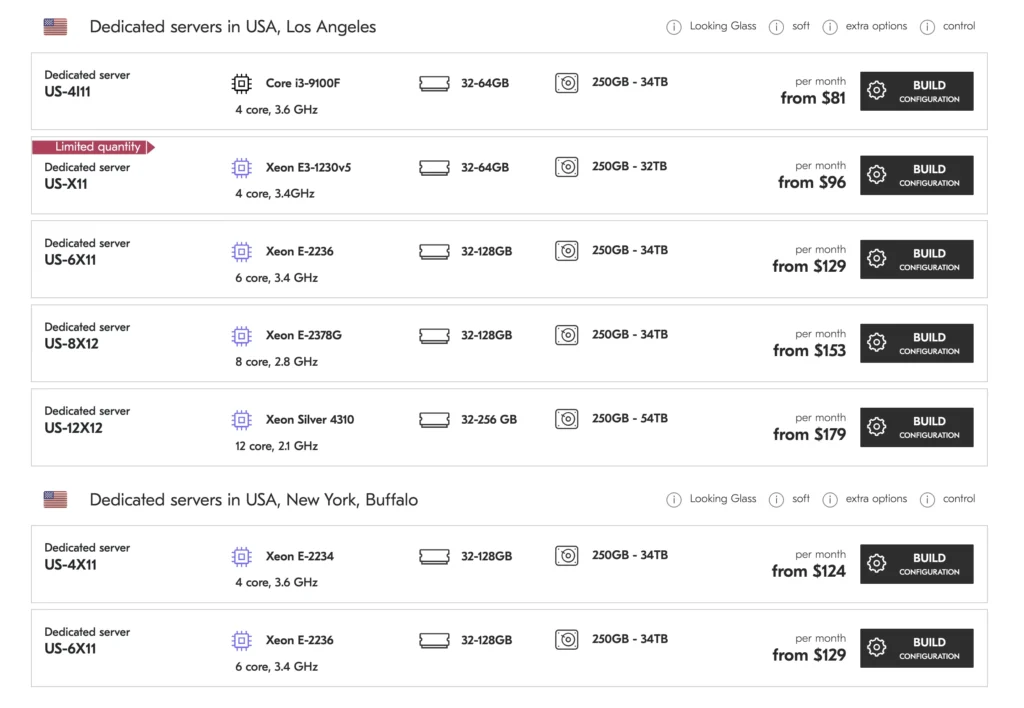
How Much Does a Dedicated Server Really Cost?
What determines physical server rental prices — and how to avoid paying for hardware you don’t actually need.
When people first look at dedicated server rental, they often expect a simple answer: “How much does a physical server cost per month?” Unfortunately, servers are not quite like a pizza where you simply choose a size from the menu.
You can find a dedicated server for a relatively modest monthly fee, while another physical machine can cost several times more. Both are technically dedicated servers, both are located in a data center, and both can run websites, applications or databases. So where does the difference come from?
The price of a dedicated server is determined by the entire infrastructure, not simply by the processor. CPU, RAM, storage, network, location, security and management can all significantly change the final monthly cost.
Let’s figure it out. If you are considering renting a physical server, you are probably asking yourself several practical questions. How much should you expect to pay? What exactly are you paying for? Is an expensive server always better? And, perhaps most importantly, how do you avoid paying for hardware you simply do not need?
I have noticed that this is where many people make their first mistake. They look at the processor name, see a large number of cores and immediately think: “More is better.” Sometimes it is. Sometimes you have just bought a very expensive heater for your data center.
What Is a Dedicated Server?
A dedicated server is a physical machine reserved for one customer. Unlike VPS hosting, where several virtual servers can operate on the same physical hardware, a dedicated server gives you the entire machine.
You get its processor, RAM, storage, network connection and other hardware resources. This can be particularly useful when you need predictable performance, a large amount of RAM, high disk throughput, specific hardware or full control over the server environment.
How Much Does Dedicated Server Rental Cost?
The monthly price of a physical server rental can vary significantly depending on the hardware and services included.
| Server level | Typical monthly range | Typical use |
|---|---|---|
| Entry-level | $40–$80+ | Websites, small applications |
| Mid-range | $80–$200+ | Databases, busy websites, virtualization |
| High-end | $200–$500+ | Heavy workloads, large databases |
| Enterprise / specialized | $500+ | GPU, high-memory and specialized infrastructure |
These are broad market-oriented ranges. Actual prices depend on hardware, location, bandwidth, support and additional services.
However, there is an important detail. The monthly rental price is not determined by the processor alone. Two servers with similar CPUs can have completely different prices because of their RAM, storage, network capacity, data center location, redundancy and additional services.
That is why simply searching for the cheapest dedicated server is not always the best strategy. The cheapest server can become expensive surprisingly quickly if it does not provide what your project actually needs.
Do not choose a server only because it has the most powerful CPU. If your workload is limited by RAM, storage or network bandwidth, additional CPU cores will not solve the real problem.
The Processor Is One of the Main Price Factors
Let’s start with the component everyone likes to talk about: the CPU.
The processor affects the price because it determines how much computational work the server can handle. But the important question is not simply, “How many cores does it have?”
The better question is: “What kind of workload will run on it?”
A web server handling thousands of relatively simple requests may require a different CPU than a server performing video encoding, scientific calculations or virtualization.
More Cores Do Not Always Mean More Performance
Suppose you have two processors. One has very high single-core performance but fewer cores. Another has many cores but lower performance per core.
For highly parallel workloads, the second processor may be the obvious winner. For workloads that depend heavily on single-thread performance, however, the first processor can sometimes perform better.
When choosing a CPU, start with the workload. More cores are valuable only when your applications can actually use them.
RAM Can Change the Price Dramatically
The next major factor is server RAM.
A basic server might be equipped with 16 or 32 GB of memory. More demanding configurations can have 64, 128, 256 GB or considerably more.
And the price difference can be substantial.
Why do you need so much memory? Imagine that your server runs a database. The more useful data can remain in memory, the less often the system needs to access slower storage.
The same principle applies to virtualization, caching, large web applications and many other workloads.
For example, if you run several virtual machines on one physical server, 32 GB of RAM can disappear surprisingly quickly. One virtual machine here, another there, a database, monitoring, a backup service — and suddenly your “large” memory configuration looks rather modest.
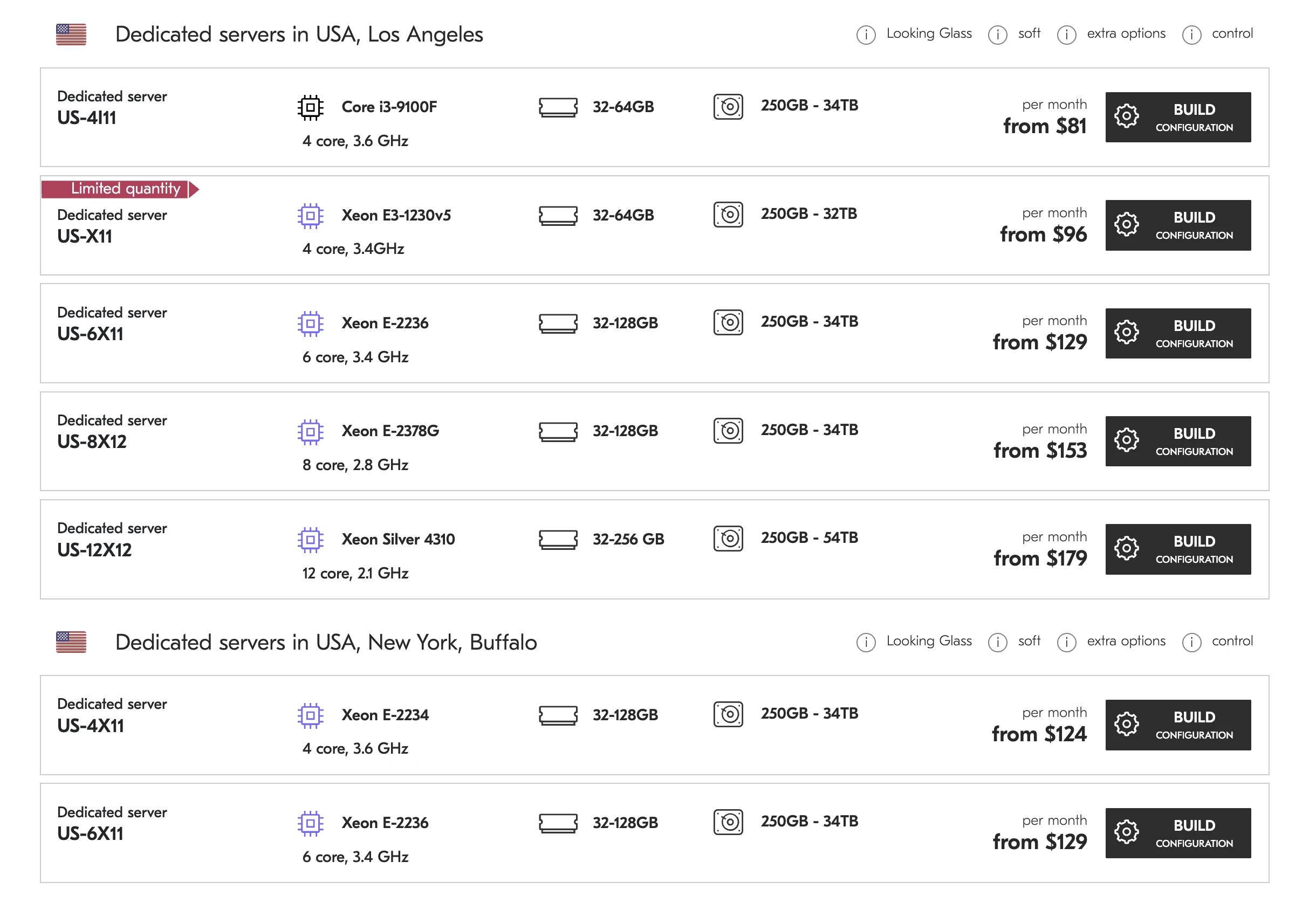
Plan RAM according to actual workload. Estimate application usage, database requirements, virtual machines and expected growth instead of buying memory simply because the specification looks impressive.
Storage: HDD, SSD or NVMe?
Storage is another major factor in the cost of dedicated server rental.
Traditional HDD drives are generally inexpensive and can provide large capacities. They can still make sense for backups, archives and workloads where maximum storage capacity is more important than extremely low latency.
SATA SSDs are considerably faster and are often a good compromise between price and performance.
Then there is NVMe SSD storage. NVMe drives can provide dramatically higher I/O performance and very low latency compared with traditional hard drives.
If your application constantly reads and writes data — for example, a busy database, analytics platform or high-traffic web application — fast storage can have a significant impact on overall system performance.
Large capacity at a lower cost. Useful for archives and backups.
A practical balance between capacity, speed and price.
Very high I/O performance for demanding applications.
But here is the trick: you do not necessarily need NVMe simply because it is faster.
If your server stores several terabytes of archived files that are rarely accessed, spending heavily on ultra-fast storage may not make financial sense.
Buying the fastest storage available is not automatically the best investment. Match storage performance to the I/O profile of your application.
Network Speed Also Affects the Price
Another factor that can easily be overlooked is the network connection.
A dedicated server may have a 100 Mbps, 1 Gbps, 10 Gbps or even faster connection depending on the provider and infrastructure.
But speed is only part of the story. You should also look at:
- included traffic volume;
- bandwidth limitations;
- port speed;
- network redundancy;
- DDoS protection;
- traffic overage policies;
- connectivity to major networks and data centers.
Imagine that you rent a powerful server with 128 GB of RAM and a fantastic CPU — but your application needs to deliver large amounts of data and the network becomes the bottleneck.
Suddenly that expensive processor is sitting there thinking, “I could have handled much more.”
Data Center Location Matters
You might be surprised how much server location can influence the price.
Dedicated servers are usually located in professional data centers, where providers pay for electricity, cooling, physical security, network connectivity and maintenance.
Operating costs vary between countries and regions. At the same time, location matters for another reason: latency.
If most of your customers are in Germany, for example, placing the server in a geographically distant region may increase network latency. If your users are spread across Europe, a well-connected European data center can be a sensible compromise.
You are not only renting hardware. You are renting hardware inside a particular infrastructure environment. Geography, connectivity and latency can directly affect the user experience.
Bandwidth and Traffic Can Become a Hidden Cost
This is one of the areas where I recommend reading the hosting provider’s terms carefully.
Two dedicated servers may appear almost identical in price, but one provider may include a large amount of monthly traffic while another may have different bandwidth conditions.
Suppose you operate a website that receives relatively little traffic. You probably do not need to worry too much.
But imagine running a file distribution service, video platform or application that transfers hundreds of gigabytes or several terabytes every month.
Estimate your monthly traffic before renting the server. For data-heavy projects, bandwidth conditions can matter almost as much as the hardware itself.
DDoS Protection and Security
Modern infrastructure is not just about CPU and RAM. Security services can also influence the price of a dedicated server.
Depending on the provider, you may have access to DDoS protection, firewall services, network filtering, isolated network segments, hardware security features and monitoring.
If your server hosts a public website or API, security is not something I would treat as an optional decoration.
A low monthly price can hide additional infrastructure costs. Always check DDoS protection, backups, traffic limits, administration and support before comparing two offers.
Managed or Unmanaged Server?
With an unmanaged dedicated server, you are generally responsible for administration yourself. You install the operating system, configure services, apply updates, monitor the machine and troubleshoot problems.
This can be an excellent option if you have the technical knowledge or your own system administrator.
A managed dedicated server usually includes some level of administration and technical support from the provider. Naturally, this additional service can increase the monthly price.
But if you do not have an experienced administrator, paying for management can sometimes be much cheaper than dealing with a serious infrastructure problem at three o’clock in the morning.
Dedicated Server vs VPS: Which Is More Economical?
A VPS is usually cheaper because physical server resources are shared among multiple customers through virtualization. A dedicated server gives you the entire physical machine.
So which is better?
It depends on the workload.
| Factor | VPS | Dedicated Server |
|---|---|---|
| Price | Usually lower | Usually higher |
| Physical resources | Virtualized | Entire physical machine |
| Scalability | Easy to scale | Hardware-dependent |
| Isolation | Virtual isolation | Full physical isolation |
| Typical use | Small and growing projects | High-load and resource-intensive workloads |
Think of it like transportation. If you need to move one small box, renting an entire truck is ridiculous. If you move furniture every day, however, your opinion about the truck may change rather quickly.
The same principle applies to servers.
What Should You Check Before Renting?
Before renting a dedicated server, I recommend checking several parameters rather than focusing exclusively on the monthly price.
How Much Should You Actually Spend?
Here is the approach I personally prefer.
Do not start with a budget such as: “I want to spend $100 a month.”
Start with the workload.
How many visitors do you have? How many requests per second? How much RAM does your application consume? How large is your database? How much traffic do you generate? Do you need NVMe? Do you need virtualization?
Define the workload first and the budget second. Once you know your CPU, RAM, storage and network requirements, comparing dedicated server offers becomes much easier.
Once you know these numbers, the appropriate server configuration becomes much easier to determine.
For a relatively simple application, an entry-level dedicated server may be perfectly sufficient. For a growing online business, something in the mid-range can provide a comfortable balance between performance and price.
For demanding enterprise workloads, the budget can move into several hundred dollars per month or more.
The Cheapest Server Is Not Always the Cheapest Solution
This sounds contradictory, but it is one of the most important things to understand.
Suppose Server A costs $60 per month, but you constantly run out of RAM. You upgrade it, add storage, purchase additional services and spend hours troubleshooting performance problems.
Server B costs $100 per month but has enough RAM, faster storage and better network performance.
Which one is cheaper?
On the invoice, obviously, Server A.
In reality, perhaps Server B.
Your time has a price. Your downtime has a price. Lost customers have a price. Sometimes the difference between two server configurations is small compared with the cost of running an underpowered machine.
This is why I always recommend looking at total cost of ownership, not just the rental price.
Your time has a price too. Your downtime has a price. Lost customers have a price. And sometimes those costs are considerably higher than the difference between two server configurations.
Conclusion
So, how much does dedicated server rental cost?
There is no single universal price. An entry-level physical server can cost around $40–$80 per month, while more powerful configurations can cost $100–$200, $300 or considerably more depending on the hardware and infrastructure.
The final price depends on the CPU, RAM, storage, network connection, traffic allowance, data center location, security services, administration and software licensing.
The best dedicated server is not necessarily the most powerful one.
It is the one that gives your project exactly the resources it needs for a reasonable monthly cost. Before you rent a physical server, calculate your workload, compare configurations and look beyond the headline price.
And here is the main thought I would like you to take away.
Do not choose a dedicated server simply because its specification looks impressive. Choose it because every component solves a real problem for your project.
If you need 128 GB of RAM, buy 128 GB. If you need high-performance NVMe storage, pay for NVMe. If your application works perfectly on a modest configuration, there is no reason to rent a server that looks like it belongs in a space program.
I would rather spend $100 on the right server than $200 on hardware I never use.
So, before you rent a physical server, take a few minutes to calculate your actual workload, compare several configurations and choose the infrastructure that fits your project. The right server does not have to be the most expensive one — it simply has to be the right one.